Written instructions:
Continue reading “Anaglyph modeling in Blender”
Toggle between material viewport shading in Blender
Are you frustrated how tedious it is to switch between the “material” viewport shading mode and other modes like wireframe?
Here’s how you can add a keyboard shortcut to allow quick toggling to the material shading.
Steps:
1. Open up file –> user preferences –>input
2. Open 3d view and then 3d view (global)
3. Scroll down and click “add new”
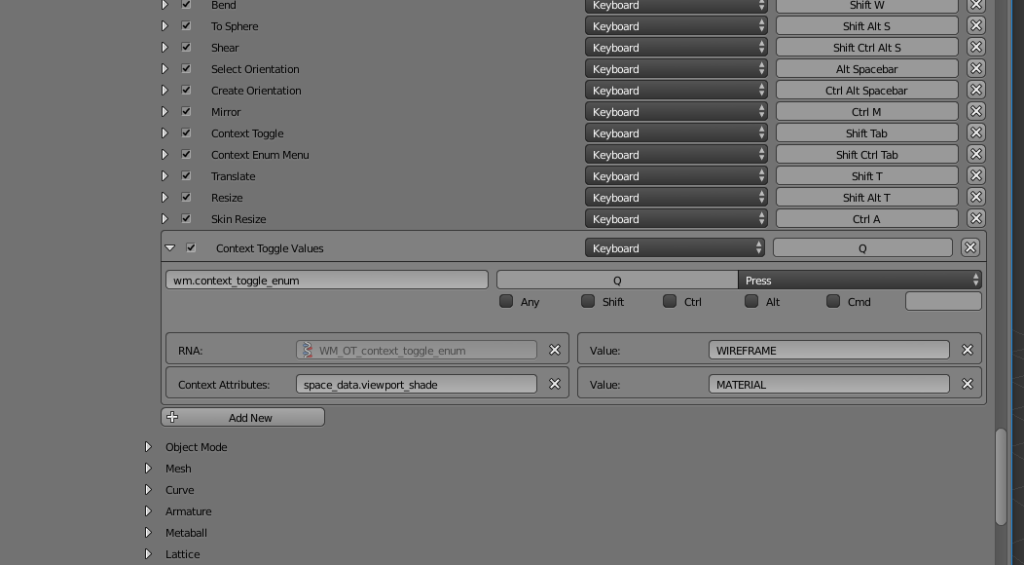
4. Type wm.context_toggle_enum to the identifier field
5. Type space_data.viewport_shade to the context string field
6. Type WIREFRAME to the upper value field
7. Type MATERIAL to the lower value field
8. Set the keyboard shortcut you desire by clicking on the “press a key” button, in our case we chose Q
Below is a screenshot of the finished settings:
Add sine-wave motion to an object via drivers in Blender
In this video tutorial we add a driver in Blender that will automatically produce sine-wave movement to our object.
Written instructions:
Continue reading “Add sine-wave motion to an object via drivers in Blender”
Fixing problematic SVG files imported into Blender
In this video tutorial we take a look at fixing SVG files that did not import correctly into Blender from Inkscape or Illustrator.
Written version:
Continue reading “Fixing problematic SVG files imported into Blender”
Blender 2.77 Morph between shapes
In this one minute video tutorial we create a morphing effect between two different shapes in Blender:
Written version:
Blender Cycles Pixel Art Tutorial
In this one minute tutorial we create a pixel art animation render with Blender Cycles by using a toon shader and freestyle.
Written version:
Getting started with soft bodies in Blender
In this video tutorial we show you how to get started with soft body physics. They can be really helpful in many things, for example in adding secondary actions to your animations and thus making your animations more organic.
Written version:
Continue reading “Getting started with soft bodies in Blender”
After Effects Stagger layers
In this video tutorial we stagger layers automatically on the After Effects timeline.
Read more:
Blender move to a straight view
In this video tutorial we show you how to move to a straight view from a user view by selecting a face and hitting shift+numpad 7.
Written version:
2D animation in Blender with grease pencil
In this tutorial we create a 2d animation of a bouncing ball using the grease pencil tool in Blender 2.77.
Written version:
Continue reading “2D animation in Blender with grease pencil”