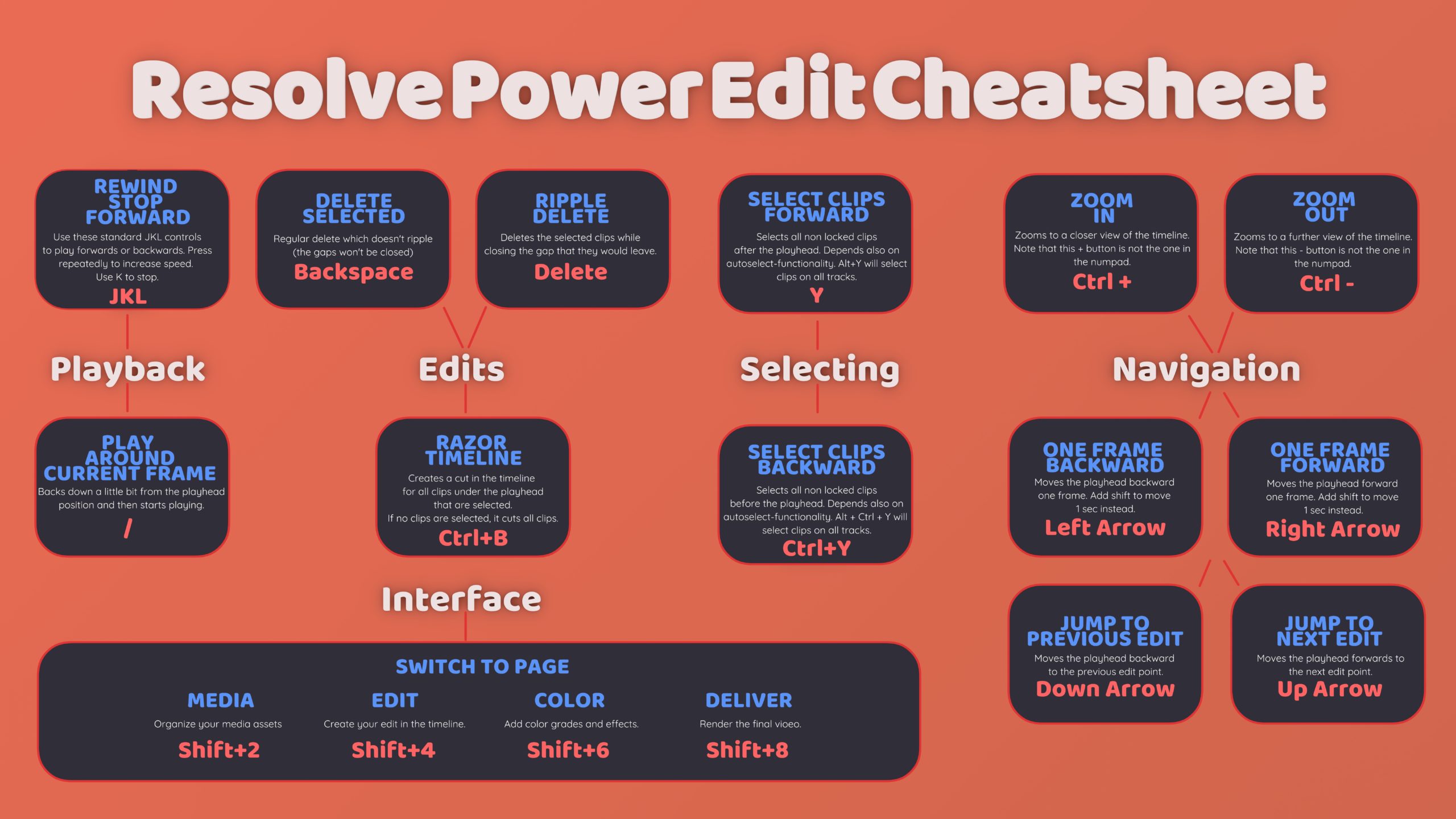
Here is a printable cheat sheet for the most important keyboard shortcuts when editing with DaVinci Resolve. Use freely!
Because your time is valuable
Here is a printable cheat sheet for the most important keyboard shortcuts when editing with DaVinci Resolve. Use freely!
For the first time in my career I encountered a video file that had two different resolutions. The beginning of the video was SD resolution and after 15 frames it jumped to a resolution of 1080p. VLC player was able to correctly switch the resolution during playback and it displayed the two different resolutions also in the codec information window. But Premiere Pro didn’t understand the file properly and never switched to the higher resolution portion of it. That was a problem because I wanted to use the high resolution in my edit.
Continue reading “Dealing with a multiresolution .mov file”During my time making video tutorials and teaching various software programs to students I have constantly struggled with finding a good tool for displaying the keystrokes and mouse buttons that I use. The tool should be free, lightweight, customizable and open source. Earlier I was quite happy with the Screencastkeys-addon for Blender but stopped using it after it got removed from the trunk of Blender and the problem with it was of course also that it was for Blender only. Since then I have tried many decent programs like KeycastOW, OSDHotkey and QiPress, but they all had some minor issues that made me search for yet another solution. Which I finally found in the latest beta-version of Carnac found here:
https://github.com/bfritscher/carnac/releases/tag/v3-beta
This tool is modern, looks good, has animations and now finally has also mouse support in the latest beta-version. I strongly recommend Carnac for the purpose of displaying key presses and mouse clicks for your recordings or streams.
In this quick video tutorial we show you how to convert videos with Blender 2.76:
Written version:
This video tutorial shows you the basics of DaVinci Resolve. We create our first project and add some video footage to the library and from there to the media pool in order to start color correcting it.
Continue reading “Getting started with DaVinci Resolve Lite”
Sometimes you want to find out what parts of your image belong to the shadows, midtones or highlights. It’s not obvious how to view that in Premiere CS6 but it’s possible to do. Here’s a quick tutorial:
Written version:
Continue reading “View shadows, midtones and highlights in Premiere CS6”
Learn how-to batch encode video files to different formats inside the free Avanti ffmpeg tool!
In this video we’ll show you an easy way to calculate amps from watts or the other way around. This can be useful especially when you are using high power lights and want to make sure your fuse or circuit breaker wont cut the power.
Continue reading “How to calculate the amount of amps from watts”